Trusted by teams at

 paladir






 paladir
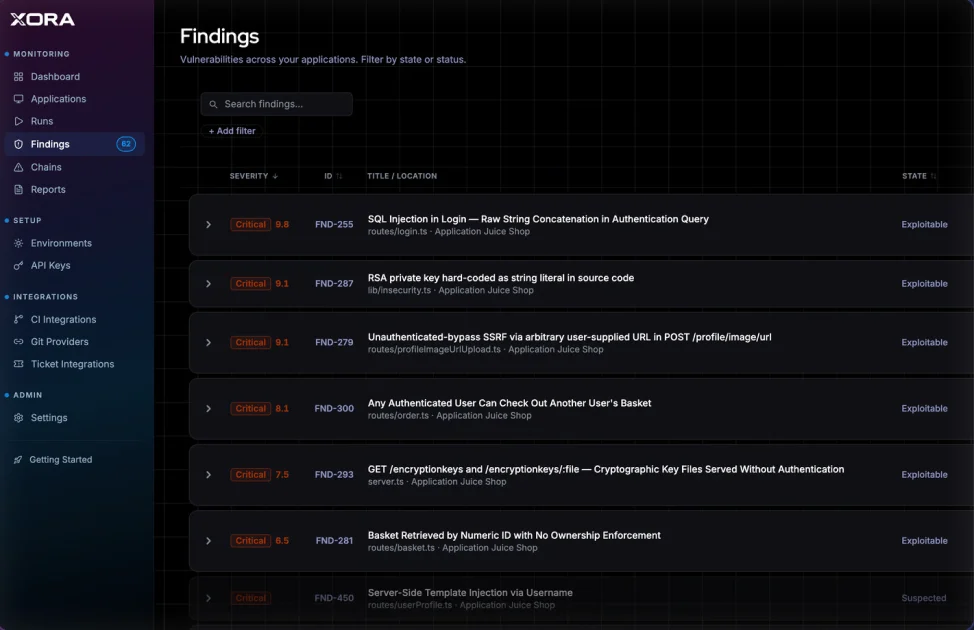
Hand developers the exploit, not an argument. Xora labels every finding by how it was confirmed.
Measured across Xora customers, November 2026.
Trusted by teams at
paladirpaladirExploit validation confirms a security finding by exploiting it, showing an attacker could use it. It lets an application security (AppSec) team triage the findings with proof attached ahead of the ones a scanner only suspects. Xora tries to exploit each finding, then labels every one as exploited at runtime, confirmed from source, or an unverified exposure.
Static tools flag more than anyone can check, and every unproven finding costs a conversation. Exploit validation puts proven findings first, with the request and response to show the developer. For finding quality in depth, see vulnerability management.
Xora is whitebox: it reads your source code to find routes and inputs.
It attacks your staging environment to validate what it found.
Exploitable (confirmed at runtime), Static (confirmed from source) or an unverified exposure, so you can sort by proof.
Exploitable findings carry the request, the response and reproduction steps.
Walk the real product: filter findings by how they were confirmed, open one an agent proved exploitable, and watch a fix get verified.
I was incredibly impressed and surprised how quickly Xora was able to add value. I don't have to hire an additional app sec engineer to find my vulnerabilities, Xora gives that to me. We can now do more with less.
Exploit validation runs as part of every test, not as a separate step you schedule. To run it on every deploy, see continuous penetration testing.
| Compared | Xora | SAST tool | DAST scanner |
|---|---|---|---|
| Reads your source code | Yes | Yes | No |
| Attacks the running app | Yes | No | Yes |
| Proves the exploit | Yes, with the request and response | No | No, flags likely issues |
| Says how each finding was confirmed | Yes, on every finding | No | No |
| Retests | Unlimited, included | Rescan | Rescan |
No, and the labels say so. Xora tries to exploit each finding first; findings it confirms from source are labelled Static, and known-CVE matches are labelled unverified exposures.
It changes what you triage first. Proven findings come with evidence; the rest are labelled, so you decide how far down the list to go.
Yes. Xora is whitebox and requires source code access.
Xora retests it, as many times as you need, at no extra cost. Findings Xora exploited are retested by replaying the exploit; findings confirmed from source are re-checked on the next scan. Either way, a finding closes on evidence.
We ran Xora against OWASP Juice Shop, a deliberately vulnerable practice app, and wrote up the findings, evidence, severity and remediation guidance.
Enter your email and we'll send you the PDF. No sales call required to see it.
