Trusted by teams at

 paladir






 paladir
Every finding comes with the file and line it traces to, how it was confirmed, and how to fix it.
Trusted by teams at
paladirpaladirPenetration testing for developers delivers findings in the form engineers act on. Each finding names the file and line it traces to, shows how to reproduce it and explains the fix. Findings land in the tools the team already uses. Xora adds generated patches and fix pull requests, and sends findings to Jira, Linear and other trackers.
Developers get a report written for an auditor, then spend days finding the code each finding points at. Xora starts from your source, so findings arrive where the work happens. To catch issues before they ship, add a CI release gate.
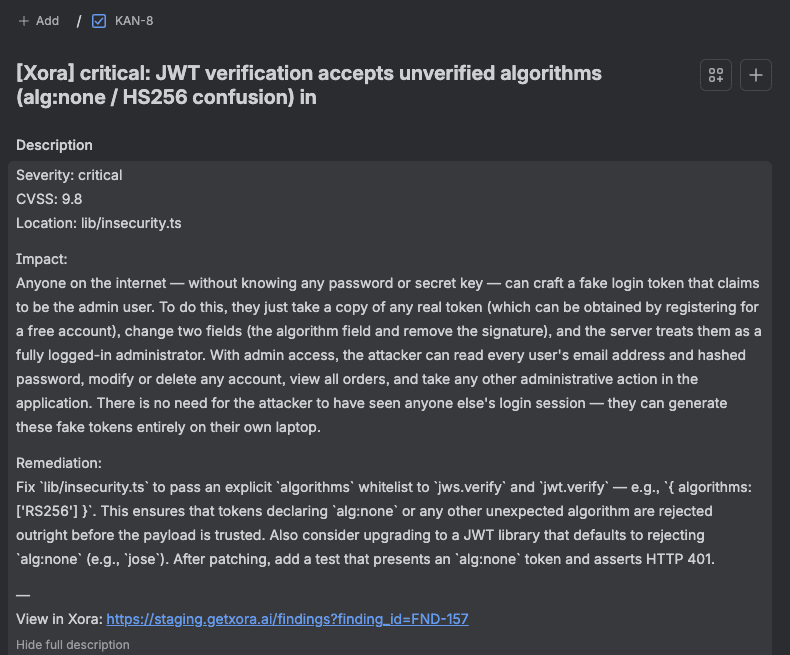
Each finding names the file and line it traces to, with evidence and remediation guidance.
Findings land in Jira, Linear, GitHub Issues, Asana or ClickUp, and join the normal sprint.
Generate a patch and Xora opens a fix pull request. Your team reviews it and decides what merges.
Retests are unlimited. For an exploited finding, the retest replays the exploit.
Walk the real product: filter findings by how they were confirmed, open one an agent proved exploitable, and watch a fix get verified.
I was incredibly impressed and surprised how quickly Xora was able to add value. I don't have to hire an additional app sec engineer to find my vulnerabilities, Xora gives that to me. We can now do more with less.
Every finding is labelled by how it was confirmed, so developers start with the ones an attack got through. Shipping a lot of assistant-written code? See AI code security.
| Compared | Xora | Annual pentest report | SAST tool |
|---|---|---|---|
| Points to the file and line | Yes | Rarely | Yes |
| Proves the exploit | Yes, with the request and response | Yes | No |
| Generated patches and fix PRs | Yes, your team reviews and merges | No | Some tools |
| Lands in your tracker | Jira, Linear and more | As a PDF | Yes |
| Retests | Unlimited, included | Often quoted separately | Rescan |
No. Generated patches and fix pull requests are included, but a patch is generated when your team asks for one, and nothing merges without your review.
Yes. Xora is whitebox and requires source code access; that is how findings get a file and line.
In the Xora dashboard, in your issue tracker as tickets, and in your editor through the Xora MCP server.
Yes. For web and API findings, generate a patch and Xora opens a fix pull request on GitHub, Bitbucket or Azure DevOps. The Xora MCP (Model Context Protocol) server also brings each finding's evidence and remediation guidance into Claude Code, Cursor or any MCP-capable editor, so your coding assistant can help write the fix.
We ran Xora against OWASP Juice Shop, a deliberately vulnerable practice app, and wrote up the findings, evidence, severity and remediation guidance.
Enter your email and we'll send you the PDF. No sales call required to see it.
